Saturday, 18 February 2012

To Poke or Not to Poke

To poke or not to poke? That is the question. What is a poke anyway?


A poke is a virtual nudge, a gentle one at that, to say hello, get someone else's attention, or to simply get noticed when you don't have anything in particular to say or aren't sure of what to say. 


So I say go ahead and poke! It's so much fun that it's simple yet it does wonders.


We at Mozat are offering different ways to poke your friends, besides the simple poking. It's called a magic poke!


MAGIC POKE SOMEONE NOW


For our avid users, I'm pretty sure that you are well aware of this feature. For the newbies on MOZAT, you have a variety of magic pokes to choose from - from giving your friend a gift, a mug of beer or greeting him or her a happy birthday to kicking, robbing or kidnapping your friend! It's so much fun!

Simply visit your friend's profile and poke. It's okay to be playful once in a while. 

So let's all send a poke, a magic poke or two and let someone we know (or care about) that he or she is thought of today. Happy poking!

Have a nice day!

***

Download the latest version of MOZAT from www.mozat.com and share the love. Follow us on Twitter: @MozatNigeria

Friday, 17 February 2012

How to Chat on Facebook Using MOZAT by Olayinka Oladele

It's Saturday and while I'm thinking of something worthwhile to do, I happily recall a post made by Olayinka Oladele, a talented blogger whose expert tech tips and "how-tos" have become a reason why many people visit his blog, including yours truly.


So he posted this a couple of days back, an easy-to-follow tip on starting a chat conversation on Facebook using MOZAT. Enjoy!


***


HOW TO CHAT ON FACEBOOK USING MOZAT


Seriously, MOZAT is a must have app on your mobile phone. 
Today, I'll be teaching you how to connect your facebook chat with mozat so as to use as a facebook messenger.
This among all other interesting features of mozat is one concern of mozat users today and if you are having problem trying to find a way to chat with your facebook friends? Here's the solution.
  1. Launch and Login to your Mozat
  2. Click on the Chat/Instant Messaging icon as shown below:
  3. Click on Menu then select IM Accounts. A list of Instant Messaging clients will be displayed to you
  4. From the list, Select Facebook as shown below:
  5. You will be asked to Authorize Mozat to your Facebook Chat, Click on Connect then click on "Allow" in the facebook dialog window that opens in your browser. (Make sure you've logged in to Facebook or you'll be required to do so).
  6. After these, simply go back to your mozat app and wait for mozat to login to your Facebook Chat. Do these for other available chat services like Gtalk, Yahoo... on your mozat also.
My Pin: M14R2P

If you don't have a mozat app,
 Read Review and Download here.
Learn how to Add friends on Mozat here . Follow @MozatNigeria. 


***


Olayinka Oladele's original post can be found here. He writes for The Latest Info. Follow him on Twitter: @Olaryeankarh

Have a great weekend you guys!

*Updates* Friday Surprise!

Thank God it's Friday! Today has been a packed week and we're so glad of the results!

Firstly, I (on behalf of the entire team) would like to thank our blogger friends (whose posts will be reposted here, so stay tuned!) for the review and features on MOZAT. It warms the heart to know that we are doing something that you enjoy using.

And then, some improvements and updates that we've been working on are now released! Starting off with the following:

1) 80 spankin' new smileys to spice up your conversations!
There's a smiley for whatever you're feeling at the moment.


SOME OF THE NEW SMILEYS FOR CHATTING

2) Symbian push notificationsFor those who are using Symbian-powered phones, push notifications on chatting (on MoChat, our internal chatting service, as well as other IMs such as Yahoo!, MSN and GTalk) are now available. Now you won't miss messages from your friends anymore.

3) Improved Polls Listing
The popular polls are now listed on top so it's easy to know which polls have the highest number of votes and responses. The recently created ones are under "Recent Polls" so you won't miss those either.

4) Easy to add a friend on Java's "grid view" version
We have introduced the "grid view" on Java, where you see a complete lineup of your apps within MOZAT in one screen or page. It's like a launch pad where you can conveniently click on whatever you fancy.

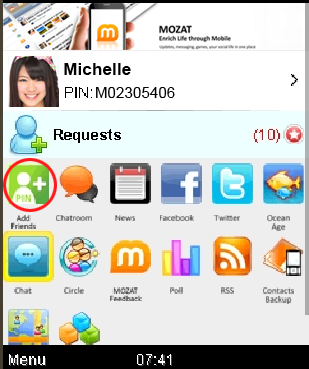
From this page, you can conveniently add a friend because we added the "Add Friend" feature right on the first row, first icon on the left, so you won't miss it. 
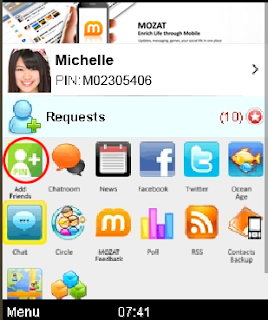
"GRID" VIEW VERSION ON JAVA FEATURING THE NEW "ADD FRIEND" ICON

5) Easy-switch chat for concurrent chatting

You can now easily switch from one chat conversation to the other with the easy-switch chatting. It gives you the freedom to chat with more than one friend at the same time conveniently. Happy chatting!

6) Out-of-memory issue
We solved this bug so you can maximise MOZAT and not worry or be bugged down by this problem. Problem solved!

7) BIS for BB issue
BlackBerry users, rejoice! We have addressed this problem and now, you can enjoy MOZAT and rest assure that you're riding on your BB plan.

TO ENJOY THESE IMPROVEMENTS, please go to http://mozat.com/ to download the latest version and overwrite your existing version.

There you have it. Hope you like 'em! It's Friday, be safe!

Catch you all again soon!

Wednesday, 15 February 2012

How to Add Friends on MOZAT by Jide Ogunsanya of OgbongeBlog


Good morning, ladies and gentlemen! 

We would like to share a useful writeup on how to add friends on MOZAT, thoroughly written by Jide Ogunsanya in his Ogbongeblog. He covered the first few critical steps after successfully downloading and installing MOZAT onto your phone, so here's the entry and hope you guys like it:

Thanks, Jide!

***

HOW TO ADD FRIENDS ON MOZAT CHAT APP

After you might have installed Mozat messenger onto your phone, you will have to add friends for you to chat using the Mozat app.  You can add friends by adding their Mozat PINs. If you know the phone number of your friend, you can also add the friend using his/her mobile number.


How To Get Started

==> Launch the Mozat App
==> Scroll to "Chats"  (right under the Mozat screen)
==> Select Menu.
==> You will see some options. Select ADD FRIEND
==> You will see the different ways you can add friends i.e Add by PIN, Add by Mobile Number etc

==> Select "add by PIN" if you know the PIN of the friend you want to add. Enter the PIN and select OK.
==> Select "add by mobile number" if you know the phone number of the friend you want to add.

A request will be sent to the friend and once accepted, you guys will be connected and can start chatting on Mozat.

The SEARCH for FRIENDS option allows you to search for those that are online, those that have pictures and you can also choose if it is male or female you want.

That's all.

Note: Though you can use Mozat app to chat with a Blackberry user who also have a Mozat account but you cannot add BBM PIN to the Mozat app. You can only add a MOZAT PIN.

I hope this helps.

If you are yet to download Mozat, click here to download Mozat Chat App Now!

Cheers!


***


Jide's post can be found on this link. Jide is the moving force behind the popular OgbongeBlog. He is an online researcher, an Internet marketer, a techie guy as well as a social media expert. And based on what we read in his blog, he now works for one of Nigeria's telcos. 


Again, thanks, Jide and we wish you all the best!


By the way, if you have guys have a review on MOZAT or would like to make an app review or have already done so, feel free to drop us an email at welisten@mozat.com with "MOZAT Review" on the subject line. You may also use this same email if you would like to request more information about MOZAT. 


It's also the same email if you wish to report bugs, request features or have feedback and suggestions. We'd love to hear from you.


Meantime, enjoy the rest of Thursday!

MOZAT Review by Essien Ekpenyong: Why MOZAT is Better than 2GO

We are pleased to share with you a post and MOZAT review by Essien Ekpenyong, whose blog provides interesting information on the latest technology, tweaks and useful tips. 

Thanks again, Essien (Dekokoblog)!

***

I posted earlier about the advent of the next new thing in the world of social chating and interaction. Mozat is the next BBM. In my own view, it has these features that 2go cannot give you.

I want to write on the feature Mozat has that is advantageous to us Social network users.

1) Mozat enables you to control other social networking website like facebook, twitter. You cannot only chat with your facebook friends in Mozat but you can also update your facebook status. If you have properly connect your twitter and facebook account to Mozat, any status update you post in Mozat will be automatically updated or posted in your facebook wall and twitter page. Here, you dont need to log in to these sites, you can easily update through Mozat.Did I forgot to mention that you can also connect with your G.Talk friends in Mozat. This is a cool apps, a must have if you want to maximise your social network presence.

2) Mozat does not only optimise your social network status quo, but also enable you to save or BACK UP your contacts. It gives an easy and concise platform to easily backup ones contact incase your phone is stolen or otherwise. If you have lost your contacts, all you have to do is to use your new phone to log in to Mozat and RESTORE your lost mozat. Isn't this cool. Can you compare this services to 2go. This is why I said, it is our new Blackberry Messenger.

3) For those of us that are in love with games, Mozat had us in mind before launching because its game section is second to none in the history of mobile social network messenger.

Mozat, as I said before is a new phenomenon one needs to exploit fully. If you have not started using these services, rush now to www.mozat.com and register. Add as many friend friends as you like and enjoy the groove.

I wish you a happy chating days and a Happy Strike Ending. Cheers!

***

Essien's review can be found here: Why MOZAT is Better than 2Go

You may visit Dekokoblog for more interesting writeups on the latest news, technology and various tips and how-tos.

Also, we encourage everyone to try MOZAT and send us what you think. Send in your MOZAT reviews at welisten@mozat.com, we will feature them and let the entire community know. Indicate "MOZAT Review" on the subject line.

See you around and have a good day!

Monday, 13 February 2012

3 Ways to Make Someone's V-Day Special with MOZAT

It's Valentine's Day! Have you been bitten by the love bug yet? If yes, good for you. We're pretty sure you have some special night planned out for your beloved tonight. If not, there's no reason to sulk in the corner as Valentine's Day is not just for cooing love birds and blushing couples. What matters is spending it with people you care about, like your family and friends, or letting them know they are thought of.

Reach out to them and let them know they are remembered. That's sure to make them smile, and make you feel good, as well. Send them a Valentine greeting and don't wait for Cupid to shoot his arrow. Shoot yours.  

Anyway, single or not, here are three ways on how you can make someone's day — be it your special someone, a friend or a relative —  today with MOZAT:

1) Send your virtual hugs and greetings through MoChat. It doesn't have to be for a significant other, does it?

V-Day greetings on MoChat


2) Update your status on MOZAT by posting a Valentine's Day trivia. Or anything Valentine-related. Make your friends' day by sharing an interesting piece of info on Valentine. Get them to share their V-Day trivia, too!


Post a Valentine trivia on your status
If your MOZAT account is integrated with your Facebook and Twitter, then you are sharing to more friends, so expect a "likes", comments and retweets!

3) Enter the chatroom and spread the love. Go ahead and socialise. It's fun to share V-Day ideas with others, in case you feel like missing out on some. Better yet, stay on and gain new friends this Valentine's Day just be sending your warm greetings.


Enter a chatroom and wish everyone a Happy Valentine!
So these are just some ideas on how you can send your Valentine greetings to your special someone, friends or even members of the community that you may not personally know, but have the opportunity to get to know better.

Got something to share?  We'd love to know how you can make MOZAT a part of your Valentine's Day!


See you around!

Monday, 30 January 2012

Greetings from the MOZAT Camp!


Hello, friends! As you may have read in our profile, this is MOZAT's blog for our dear users in Nigeria. We set up this page so we can quickly reach you for updates, announcements and anything and everything about MOZAT, in addition to the other social clicks that we already have:

On Facebook, a community page: facebook.com/mozatnigeria

And, of course, our official website, where you can download the latest version of MOZAT for your phone: www.mozat.com

MOZAT, an all-in-one app for real-time messaging, chatting, mobile gaming and access to popular social networks

What prompted us to start this simple blog? It's pretty simple, actually. 

We observed a sudden surge of downloads in Nigeria and the increase of new users. And for that, we thank you for trying MOZAT out and using it everyday. We are extremely grateful and are honoured to be of service to you as you try to always be connected with your friends through your ever reliable mobile phone.

So in the next few posts, we will try to teach you on how easy it is to navigate around MOZAT - from sending real-time messages to your friends, to sharing files, chatting, joining chatrooms to playing games, accessing public polls and circles, as well as integrating your Facebook and Twitter accounts. Not to mention, setting up your instant messaging accounts in Yahoo!, MSN and GTalk. 

For now, stay tuned and keep MOZAT on... in your phone!

Cheers!