Wednesday, 22 February 2012

How to Add Your Twitter Account on MOZAT

Here's another quick tutorial on how to integrate your Twitter account with MOZAT. From your Java phone's grid view, click on the Twitter icon.


Enter your Twitter name and password. Make sure that the box below the password is ticked. You have to "publish your status to your Twitter account".


Once this is done, whatever you type on your MOZAT status (on the "What's happening?" space) will be tweeted to your followers.

You will have access to your timeline as well, perfectly combined with the updates feeds from your friends on MOZAT and/or Facebook (if this account has already been intergrated with MOZAT).


Hope this quick tutorial helps. Feel free to let us know of your comments or suggestions on how we can improve MOZAT better.

We would love to hear from you.! For comments and suggestions, drop us a mail at welisten@mozat.com or let us know your comments in our official circle within MOZAT: MOZAT Nigeria Feedback.


How to Add Your IM Accounts

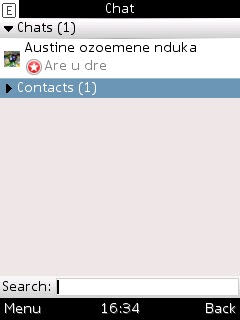
This is a quick tutorial on how to add 3rd party instant messaging accounts such as Yahoo Messenger!, MSN and GTalk, so you can start chatting with your buddies on MOZAT. From your Java phone's grid view, you should be able to see the following:

1. Click on the "Chat" icon:


2. You will then be brought to this page. Click on "Contacts".


3. Click on "Add a new chat account"


5. Choose which IM service you would like to add.


6. Let's say you're adding an MSN account. Enter you email and password.


7. Confirm by clicking on "Add Account".


Wait a while and you shall see your account. Repeat the same steps if you wish to add the rest of your IM accounts and integrate with your MOZAT account.

Then, you're free to chat with your buddies from all the IMs that you have.

Happy chatting!


Tuesday, 21 February 2012

Discover MOZAT Users Around You

It's Friday once again and allow us to wish you a great weekend ahead. But before you make plans for Friday night or the weekend, here's a quick entry to remind you, once again, of some improvements that we made on MOZAT. These are in addition to what we announced a couple of days ago about the improved chatting experience in the chatroom.

First off, we are proud to announce the availability of a location-based service called "Nearby Users" for Java users. This lets you see other users near you, eventhough you are not using smartphone or a GPS-powered phone. We are thrilled for you to try it out so please do and let us know what you think.

In order for your to detect users that are close to you, you got to be near or within what we call the Java points across Nigeria. These are the following points:


Benin University, Benin City
Bower's Tower, Ibadan
Central Bank of Nigeria, Abuja
Emir's Palace (entramce), Zaria
Enugu White House, Enugu
Hussey College, Warri
Ilorin Central Mosque, Ilorin
Kano Railway Station, Kano
Lagos King's College, Lagos
Maiduguri Government House
Ogbomoso Stadium
Port Harcour Town, Port Harcourt
Rancher's Bee, Kaduna
University of Calabar, Calabar

To have an accurate "social discovery" you have to be within 50km radius of any of these Java points and you will see users near you. You can freely send them a message and when they reply, you are automatically friends. If you are within a Java point and it doesn't work, try redownloading MOZAT and overwriting your existing version.


YOU WILL SEE THE JAVA POINTS AVAILABLE TO YOU

DISCOVER USERS NEARBY AFTER CHOOSING AN APPROPRIATE JAVA POINT

SAY HI AND SEND A MESSAGE TO THE USER OR VIEW THE PROFILE

Go ahead and make new friends. It's a fun new way of discovering new ones that are geographically close to you.

Another thing is the offline message. You can now receive messages even when you're offline so you don't miss a thing - whether important or not.


RECEIVE OFFLINE MESSAGES ONCE YOU GO ONLINE

So, these are all for now. Catch you again soon. Have a wonderful weekend ahead!

Improved Chatroom Experience on MOZAT

We are pleased to let you know that we are slowly but surely improving our chatrooms so that you guys can have a good overall experience. These are the latest improvements:

1. @Friend Response - when you're in a chatroom and messages are scrolling up fast, you also want a way to respond to a specific message fast and not miss it. Now we made it easy for you to reply by simply clicking on the sender's message. The "@" sign will appear plus the name of the sender so you can immediately type in your reply without having the need to indicate the name of the message sender. It saves time and it's pretty easy!

QUICKLY RESPOND TO A SENDER WITHOUT TYPING IN THE NAME

2. Chatroom details are clearly indicated before you start chatting. You will clearly see how many participants are there in a chatroom. And of course, there's a short reminder on chatroom etiquette. We are all encouraged to be nice. :)
MORE ORGANISED CHATROOM DETAILS

3. Coloured backgrounds - We implemented this change so that it's easy to read messages from different people. It's easier to keep track of conversations and more fun to chat, too!

COLOURED BACKGROUNDS FOR EASY READING 

We hope you'll have even more fun now that we've implemented these changes. Don't forget to upgrade your version to the latest by downloading the latest client from www.mozat.com and overwriting your existing version.

Have fun making friends in the chatroom!


Sunday, 19 February 2012

Top 10 Things Users Like About MOZAT

We made a quick exercise late last week and asked you guys about what you like about MOZAT. Compiled all the responses and got these top 10 things users like about our app:

1. Chatting with many friends - yes, you may chat individually or initiate a group chat. You can even chat with your buddies on YM!, MSN or GTalk. If you haven't tried it yet, please integrate your IMs with MoChat and


2. Syncing social networks like Facebook and Twitter 

3. Mobile ping

4. Magic pokes

5. MOZAT is fun because “it keeps me busy when I’m not busy”.

6. Smileys are great!

7. Facebook on MOZAT has improved.

8. There’s a PIN like the BBM.

9. Easy to post and share photos on mobile

10. MOZAT is a community of good people. (Strongly agree!)Thanks to you because you're helping us build a community of good people.

Thanks for responding to our tweets. We appreciate all your replies.

We will help you earn new friends by shouting out your MOZAT PIN and the answer to our questions (which we will tweet about and will change often). But of course, you gotta reply using MOZAT.

Happy Monday! Hope you have a wonderful week ahead!

Saturday, 18 February 2012

MOZAT Review by Jenuwa Efemena: The New BlackBerry Messenger?

The PIN is your identity on MOZAT. It's unique and your access to a world of new friends, games, instant messaging, social sharing. We've seen in quite a few forums that users are actually encouraging their friends or other users to drop their PINs there so they can communicate. Cool, huh?


In some posts and comments, users refer to MOZAT as the BlackBerry Messenger (BBM) for Java phones. 


We don't care how you refer to it because we're just glad you are using it to communicate with your friends no matter what phone you're using. So here's a review by Jenuwa Efemena on what he thinks of MOZAT's messaging service.


***


MOZAT Review: The New BlackBerry Messenger?

Hktwq_mozat-logo-tagline-rgb

This new social IM app is skyrocketing to be top amongst strong competitors ininstant messaging like 2go, WhatsApp, Nimbuzz, BBM, eBuddy, etc. It keeps gaining more users each day because of its amazing features. It has MSN chat, Facebook chat, Yahoo chat, Gtalk(google talk) and its own chat; where you get to add friends who use it with their pins, phone number or chat nicknames. So the word 'Pin' or 'Ping' is no longer restricted to blackberry users alone. 

Mozat also displays your friends' facebook and twitter updates which is one feature that made me fall in love with it instantly. Hence, you get to be everywhere from just a single app.

Just like the blackberry messenger, it runs in the background of your phone and alerts you when a new message comes(this feature is not available for java phone users). You get to view display pictures but you can't save one's picture as it is on bbm. You can also send/receive image, video and audio files.

Another awesome feature Mozat has is the 'Broadcast' feature where you can send a particular message at once to all your contacts. You will get blocked from sendingbroadcasts if you use it recklessly by sending too many. There is a 'Nearby Users' option which uses your location(network assisted) to suggest friends on Mozat that are close to you. Suprisingly, this feature works perfectly.

It also features 'Contacts Backup'. Mozat synchronises the contacts on your phone memory with their server and backs it up for you. The numbers can be retrieved at anytime anytime.

The RSS Reader feature collects news in the background and pushes the updates to you when there are new messages coming. You can also share with your friends with just a click. It has various chat rooms where you get to meet cool and interesting people. Its strength over the rest chat apps is that it combines all their features together. Another advantage is that it is available on all platforms; Java, Symbian, Blackberry, Android, iOS and will be available for Windows phones soon.

Mozat App is not so refined. Maybe its just me, but I do find the alert sound very annoying, although it's at its early stage and all flaws will be rectified in future updates.

Mozat is the next big thing in instant messaging! Do visit www.mozat.com, download the version supported by your mobile phone and get pinging!!!

***
Jenuwa Efemena's original post can be viewed here. He writes for Tektweet, a blog dedicated for all things technology, gadget and mobile. 

Download the latest version of MOZAT from www.mozat.com and start adding friends thought their PINs.

How to Save All Your Phone Contacts on MOZAT by Olayinka Oladele

Your phonebook holds the most important "treasures" in the world. They represent your loved ones, family and friends. So it's always a hassle when we lose our phones because we have to save all our contacts all over again after asking them one by one for their numbers.

One MOZAT feature that safeguards your contacts is the "Contacts Backup". Olayinka Oladele gives us a quick step-by-step guide on how to back up your contacts through MOZAT.

***

HOW TO SAVE ALL YOUR PHONE CONTACTS ON MOZAT (CONTACTS BACKUP)

Have you ever thought of an easy way to backup your phone's contact without the expense of backup subscription? Its so simple now! Mozat is now allowing users to backup phone contacts without paying a dime.

With Mozat, you can backup all your mobile phone's contact with ease by following the steps below:
  1. Launch your Mozat app and Login
  2. Click on the third (flower) icon on the MOZAT icon list as shown below:
  3. Select Contacts Backup
  4. Wait for the Back up Screen to Show and select Backup Now; Allow any prompt message that is shown then wait for your phone contacts to synchronise.
All done! If you follow the steps above correctly, No need to pay for contactsbackup again as it is free with MOZAT!
Benefits
  • Never loose contacts even if your phone is formatted.
  • Backup is totally free (No hidden Charges except for browsing charged by your network provider)
  • It's fast, easy and secure because you can always get yourcontacts back whenever you are pinging with your mozat app.
Another way Mozat Improves the Chat community.

Related:
Read Review and Download MOZAT here
How to Chat on Facebook using MOZAT
How to add friends on Mozat
Follow @MozatNigeria on Twitter.

My Pin: M14R2P

***

Olayinka Oladele is a young yet talented blogger who writes about useful tech tips and "how-tos". His original post can be found here. He writes for The Latest Info. Go check him out and follow him on Twitter: @Olaryeankarh

Download the latest version of MOZAT from www.mozat.com and start adding your friends through their PINs.